






Kelsey O’Berry | 05/20/2026
Smart Cards vs. Mobile Credentials: Which Should You Use?
Speak With An Expert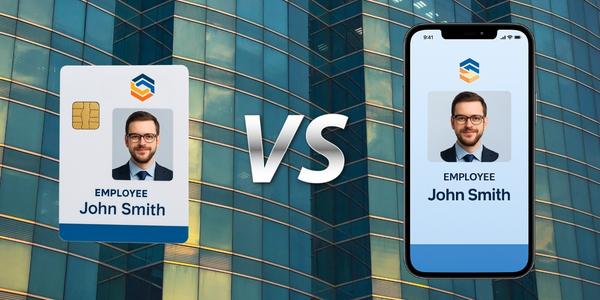

Solutions
Main menu
Discover the most durable, secure logical access control systems. rf IDEAS is backed by engineering and technical support to address any authentication need.
Industries
Main menu
Discover industry-specific digital access control systems, from healthcare to education, for your security-critical business needs.
Products
Main menu
WAVE ID® card readers are contactless access control solutions from rf IDEAS, the creators of pcProx card readers. Learn all about our RFID readers here.
Credentials
Main menu
Supporting the widest range of access control credentials and authentication credentials worldwide, rf IDEAS enables quick access and simplified authentication for organizations across the world.
Partners
Main menu
As a member of the ENGAGE Partner Program, it’s simple to get the answers you need and the marketing materials and technical information that help build customer relationships.
Support
Main menu
Get all the support you need to be successful. Our support center provides product manuals, firmware and application downloads, software conversion tools, answers to frequently asked questions, and access to live technical and sales support
About us
Main menu
rf IDEAS manufactures authentication solutions designed to simplify complex security problems and workflows across multiple industries.
Solutions
Main menu
Discover the most durable, secure logical access control systems. rf IDEAS is backed by engineering and technical support to address any authentication need.
Industries
Main menu
Discover industry-specific digital access control systems, from healthcare to education, for your security-critical business needs.
Products
Main menu
WAVE ID® card readers are contactless access control solutions from rf IDEAS, the creators of pcProx card readers. Learn all about our RFID readers here.
Credentials
Main menu
Supporting the widest range of access control credentials and authentication credentials worldwide, rf IDEAS enables quick access and simplified authentication for organizations across the world.
Partners
Main menu
As a member of the ENGAGE Partner Program, it’s simple to get the answers you need and the marketing materials and technical information that help build customer relationships.
Support
Main menu
Get all the support you need to be successful. Our support center provides product manuals, firmware and application downloads, software conversion tools, answers to frequently asked questions, and access to live technical and sales support
About us
Main menu
rf IDEAS manufactures authentication solutions designed to simplify complex security problems and workflows across multiple industries.
Compromised credentials remain one of the most direct paths into an organization’s systems. According to the 2025 Verizon Data Breach Investigations Report, stolen credentials were responsible for 22% of data breaches.1 That figure underscores why the technology behind how identities are verified matters as much as the policies governing them.
As credential-based attacks persist, organizations are exploring stronger ways to verify identity and control access to systems and devices. Physical smart cards have long supported secure authentication across workplaces and facilities, while mobile credentials are gaining traction as organizations adopt more flexible digital identity strategies.
Both approaches enable fast, secure identity verification, but they differ in how credentials are issued, managed and used across systems. As a result, many organizations evaluating authentication technologies find themselves comparing smart card vs. mobile credential solutions to determine which option best supports their security and operational needs.
A smart card is a physical credential embedded with a secure microchip that stores encrypted identity data. Users authenticate by tapping or inserting the card into a compatible reader connected to a workstation, printer, door access system or other device. Unlike older proximity cards, smart cards use encrypted communication between the credential and the reader, making them significantly more resistant to cloning and credential theft.
Smart cards are commonly used for:
A mobile credential stores identity information on a smartphone or mobile device. Instead of tapping a badge, users present their phone to a compatible reader using technologies such as NFC or Bluetooth. The credential is provisioned digitally through a secure app or identity platform and can be issued, updated or revoked without requiring physical card distribution.
Mobile credentials are often used for:
Although smart cards and mobile credentials differ in form factor, both credential types support many of the same authentication capabilities, including:
Because they serve the same core purpose, choosing between smart card and mobile credential authentication often comes down to your existing infrastructure, workforce composition and how you need to manage credentials at scale. Understanding where each approach excels and where it introduces operational considerations is the starting point for building a deployment strategy that works.
Smart cards remain one of the most widely deployed authentication credentials because they combine strong security with consistent, hardware-based performance that does not depend on device availability or battery life.
Smart cards offer several advantages when secure, reliable authentication is a priority:
Smart cards also introduce a few operational considerations worth evaluating before deployment:
Smart cards are commonly used in industries where reliability, controlled access environments and compliance requirements are priorities, including:
Mobile credentials provide a flexible authentication approach that leverages the smartphones users already carry, reducing the overhead of physical card management while supporting modern identity strategies.
Organizations adopting mobile credentials benefit from:
Mobile credentials also introduce challenges worth evaluating as part of your deployment planning:
Mobile credentials are increasingly used in environments such as:
Both smart cards and mobile credentials provide secure, reliable ways to authenticate users and control access to systems and facilities. The right choice depends on your existing infrastructure, security requirements, compliance obligations and how your workforce prefers to interact with authentication systems.
Many organizations find that supporting both credential types delivers the best outcome. They get the reliability and physical access familiarity of smart cards alongside the flexibility and digital provisioning advantages of mobile credentials. A hybrid approach also supports phased migrations, letting you expand mobile authentication over time without disrupting existing workflows.
rf IDEAS® supports a wide range of authentication methods with credential readers designed to work with both physical smart cards and mobile credentials. With solutions that integrate with existing identity and access management systems, you can implement authentication workflows that align with your security policies and operational needs, with the flexibility to support both approaches as your environment evolves.
Contact us to learn how rf IDEAS can help you support smart cards, mobile credentials and other secure authentication methods across your environment.
Please note: The information you provide in this form will help us direct you to the appropriate partner who can best fulfill your request.
