Workplace access should be simple, but passwords rarely are. They slow employees down by creating friction during the sign-in process and drive repeat support tickets when people get locked out. In fact, according to the FIDO Alliance’s World Password Day 2024 report, 26% of people reset or recover at least one password every month.1
Mobile authentication helps reduce that friction by shifting identity checks away from password entry and replacing it with the mobile device employees already carry. This results in a more seamless login experience for employees while reducing the administrative burden and improving security for their organizations.
Key takeaways:
What is mobile authentication and why does it matter?
Mobile authentication verifies a user’s identity using a mobile device. In a workplace context, it’s often delivered through a mobile authentication system that uses mobile credentials, such as a digital badge stored in a smartphone’s digital wallet, to confirm a trusted identity and the right level of access.
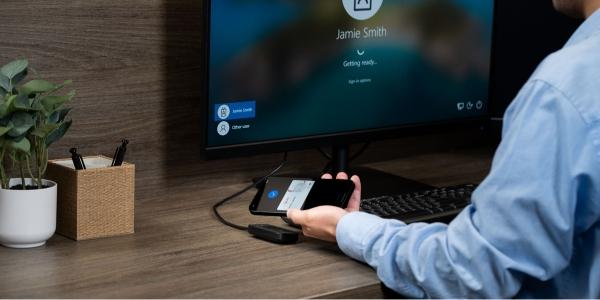
Instead of requiring users to rely on a password, PIN or physical badge, mobile credentials can be presented from a phone at the moment access is needed. For example, an employee signing in at a computer or shared workstation can tap a digital badge to a reader rather than enter a password.
Authentication happens in more places than it used to, so keeping it easy and quick is more critical than ever to preserve productivity. Employees now move between cloud applications, on-site systems and shared endpoints across locations and device types. Mobile authentication supports consistent identity verification for common scenarios such as:
- Workforce sign-ins for business applications
- Shared device access at kiosks and workstations
- Secure print release at printers and multifunction devices
- Additional verification for sensitive actions like protected data access or admin changes
Common mobile authentication methods
Mobile authentication can look different depending on the system you’re accessing and the level of security required. Here are some common methods used by organizations.
Passkeys and device-based authentication
Passkeys use cryptographic keys stored on a device to authenticate a user. Because passkeys don’t rely on shared secrets like passwords or codes, they’re designed to be more resistant to phishing. This approach is often used to strengthen sign-ins for business applications, admin tools and other higher-risk systems.
NFC authentication
Near-field communication (NFC) authentication uses a short-range “tap” interaction to confirm identity. Usually, a user holds their phone with a mobile credential near a compatible endpoint to authenticate, similar to making a purchase with a mobile wallet. This makes it a strong fit for intentional, point-of-access moments like releasing print jobs or signing into shared workstations or kiosks.
BLE authentication
BLE authentication uses Bluetooth® Low Energy to support proximity-based login over a longer range, often without requiring users to take an overt action like tapping a phone to a reader. The phone can present a mobile credential based on proximity, helping minimize delays in fast-moving environments where tapping is inconvenient, such as checking attendee presence at conferences or events.
5 key benefits of mobile authentication
Mobile authentication brings stronger verification into everyday access without making the process feel burdensome. It can be applied across a wide mix of systems and scenarios, giving teams a clearer way to align security, speed and usability.
-
Stronger security than passwords alone
Passwords are easy to steal, reuse and phish. Mobile authentication relies on device-based proof of identity, such as confirming a trusted device or using cryptographic keys, instead of shared secrets alone. This makes it harder for attackers to succeed with stolen credentials, even if a password is compromised.
-
Faster access with less login friction
Mobile-first methods can streamline sign-ins, especially for users who authenticate multiple times per day. Tapping a phone or confirming access through a mobile flow can be quicker than typing complex passwords, entering long codes or repeatedly resetting credentials.
-
Better support for shared devices and on-site workflows
Not every employee works from a dedicated device. Frontline teams often rely on shared workstations, kiosks and common endpoints that still need controlled access. Mobile authentication supports those workflows by helping verify the right user quickly while maintaining accountability, which can help reduce bottlenecks during shift changes, busy periods and high-traffic check-in moments.
-
Reduced password reset burden for IT teams
Password resets consume time and attention across IT and help desk teams, and they can disrupt productivity for end users. By reducing how often employees need to use passwords, mobile authentication can help cut down on lockouts and reset tickets. That helps shift effort from repetitive support tasks that can cost up to $70 per password reset, to higher-value work that can improve the overall access experience.2
-
Easier to scale across distributed teams and locations
As organizations add tools, expand to new sites or support more remote users, authentication has to keep pace. Mobile authentication scales well because employees already carry their phones, and many approaches can be managed through centralized identity policies. This makes it easier to roll out consistent access standards across locations, support a mix of user roles and adapt requirements over time without rebuilding workflows from scratch.
Strengthen identity verification with mobile authentication
Passwords often introduce friction at the exact moments teams need fast, reliable access. Mobile authentication shifts verification to a mobile device, helping your organization apply stronger identity checks across digital systems and touchpoints without adding unnecessary steps.
With rf IDEAS mobile credential readers, mobile authentication can be enabled at shared endpoints where employees need to sign in often, like workstations, printers and kiosks. This helps keep the experience consistent across locations and workflows.
Ready to simplify access and elevate authentication throughout your organization? Contact us to explore options that fit your environment and security requirements.